
M365 Copilot Agent Builder Skills: Turn Your Repeatable Prompts into Reusable Agents

TL;DR
M365 Copilot Agent Builder can now use skills, which means you can package a repeatable AI process into a reusable recipe and run it inside a lightweight agent. In my test, it recreated a weekly blog-writing workflow with strong results and no incremental credit charge under the licensing available to me at the time, but it does not replace the persistence of Cowork or the mature tools and governance in Copilot Studio.
For a long time, one of the clearest reasons to reach for a more advanced AI tool was simple: I needed a skill. I had a repeatable process, a lot of detailed guidance, and no desire to paste the same giant prompt every week. Cowork was my shining star to get work done.
That line just moved. Agent Builder inside M365 Copilot now supports skills, and after testing it with a real process I use every week, I walked away much more impressed than I expected. This is not a replacement for every other Copilot tool. It is, however, a legitimate new option for the repeatable jobs that already work well in chat.
If you would rather watch the full walkthrough, check out the video here: https://youtu.be/2CEKxAttNic
What Is a Skill in M365 Copilot Agent Builder?
A skill is a predetermined recipe for an AI agent. If you regularly type the same instructions, follow the same steps, and expect the same type of output, you can capture that process once and reuse it.
My skills are not usually one clever sentence. They are often 180 to 250 lines of guidance that explain the tone, structure, rules, checks, and expected output. The point is consistency. Instead of hoping I remember every requirement each time, the agent gets the full recipe every time.
I use Skills via Cowork for things like cleaning up my inbox after a bunch of out of office messages, creating branded assets, and even things like writing these blog posts. Once I come up with the inputs and the steps, turning those into a skill saves me repetitive work.

Bonus point: Skills are not just a Copilot thing or some proprietary Microsoft invention. Skills are becoming a broader standard for giving AI agents repeatable recipes they can follow. That means the real value is not tied to one chat window or product. You can build a skill once and potentially move or adapt it across both Copilot tools and Claude or ChatGPT or any other tool that supports skills. Each platform may handle them a little differently, but the big idea is universal: stop retyping the monster prompt and give the agent a reusable recipe instead.
Why Skills in Agent Builder Matter
Before this change, if I wanted a skill-driven experience, I would typically use Cowork. Agent Builder was useful, but it did not have a clean way to bring in a detailed reusable recipe and Cowork was the default answer. Man, did this change.
Now I can build a small agent in the Copilot interface, attach a skill, add a short set of agent instructions, and use it for a focused job. At the time of my testing, that experience was included with my M365 Copilot license and did not add an incremental credit charge. Licensing can change, especially while a feature is new, so treat that as my observed experience rather than a forever promise. But as of right now, my Cowork credit consumption is down.
The Real Workflow I Used to Test It
Every week, I publish a YouTube video and turn the content into a companion blog post. The blog is not supposed to invent a new story. It documents my explanation for people who prefer to read, makes the topic easier to find, and gives me a solid draft that I can edit into its final form.
I already had a detailed YouTube-to-blog skill for this process. It covers the title, TL;DR, headings, image placeholders, FAQ, key takeaways, voice, and a long list of content rules. It also prevents the model from wandering off to do a bunch of unrelated research and producing generic AI slop. I want my information and my point of view, just organized into a useful article and without me having to start from a blank screen every week when writing it.
The AI-generated draft is not the finish line. It gets me roughly 80 percent of the way there, and I still edit it. That is an important distinction. The value is not that AI replaces my judgment. The value is that I begin with a structured draft, from my literal own words, instead of a blank page.
Let me say this again for the people in the cheap seats. I hate AI Slop, I would never just have AI write something and post it as me. I am using AI to take my words, from my video, and put them on paper for me so I can create what you are reading.
Moving the Skill into Agent Builder
The setup itself was refreshingly small. I created a new agent, skipped the conversational builder, opened the Skills section, and uploaded the existing skill file. Then I added instructions telling the agent what it was, requiring it to use the skill for every blog request, and reminding it to stay grounded in the supplied content.
I gave the agent a name and description, created it, and started a chat. That was basically the whole configuration. The important work was already captured in the skill.
I did run into two rough edges. First, the upload dialog initially appeared to accept only ZIP files, but switching the file picker to show all files allowed me to select the skill file directly. Second, the preview experience did not give me a way to attach the transcript, so I had to create the agent before I could properly test the workflow. These are exactly the kinds of early-feature details I expect to move around.

The Result Was Better Than I Expected
Once the agent was created, I attached a YouTube video transcript and asked it to create the blog post. It produced the expected title, TL;DR, introduction, sections, image placeholders, FAQ, key takeaways, and conclusion. The result took about a minute in that test.
The visual formatting (font color for example) was not identical every time, but I did not care much about that. I copy the content into our blog platform and format it there anyway. The question was whether the agent could follow the recipe and produce a strong content foundation. Yes, it could.
Previously, a comparable Cowork run used 355 credits, which is about $3.55. I was happy to pay it because the output was worth more than the cost. But if Agent Builder can handle this particular workflow well with no incremental credit charge, it makes sense to use the simpler option.
I Ran a Blind Comparison, and Agent Builder Won
I did not want to trust my first impression, so I ran the same transcript and prompt through roughly seven different tool and model combinations. Then I removed the identifying details, labeled the outputs, and asked ChatGPT to compare them using the same criteria. ChatGPT also had the blog transcript and a good idea of what my voice is and end goal.
The Agent Builder version came out on top in that blind comparison. I for sure did not expect that. The evaluator did not know which tool produced which draft. That does not prove Agent Builder will win every writing test, but it gave me a much stronger reason to trust the result than simply saying, “This looks pretty good.”
It also reinforced a practical lesson: test the outcome you care about. I cared about accurate, usable content in my established format. A blind review was more useful than arguing about which model should theoretically be best.

Does This Replace Cowork?
No. For this workflow, I expect to use Agent Builder. For every workflow, absolutely not.
Agent Builder is still a chat-oriented experience. It does not have the same tenacity for long, multi-step work. It is not going to keep iterating through a complicated process, try many approaches, and persist the way a more autonomous tool can. It also does not support every file type and scenario that Cowork can handle.
My rule of thumb is simple: if the job already works well in chat and the main reason you moved it elsewhere was to use a skill, bring it back and test it in Agent Builder. If the job depends on deeper persistence, broader file handling, or a long chain of operations, Cowork may still be the better home.
Does This Replace Copilot Studio?
Also no. Copilot Studio brings a much more mature toolbox to agent development.
Agent Builder now has skills and knowledge, which is great, but it does not give you the same depth of tools, plugins, workflows, MCP server connections, management, and enterprise-grade design options.
I think of Agent Builder as a fast way to create focused agents that help me or a small group of people. You can share them and potentially publish them more broadly, but that does not make them equivalent to a robust Copilot Studio solution.
Use Agent Builder when the job is focused and the experience can stay lightweight. Use Copilot Studio when you need a mature agent that connects to systems, takes actions, follows enterprise processes, and needs stronger lifecycle management.
The “Use Everywhere” Setting Is the Brain Breaker
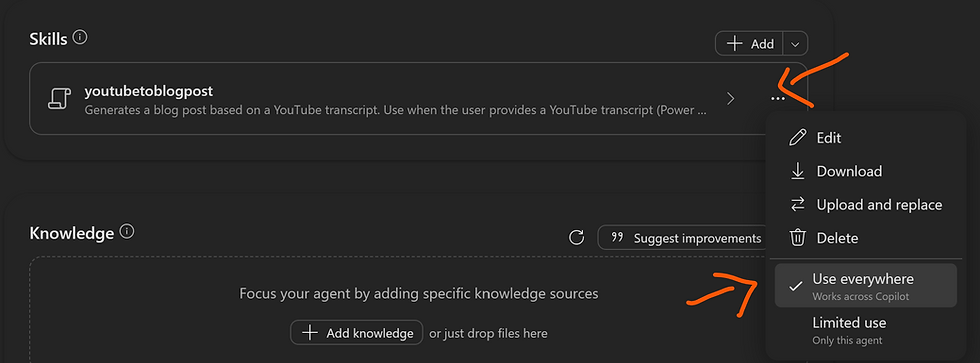
The most interesting discovery came after the agent was already working. In the skill menu, I found a setting that changed the skill from being limited to one agent to “use everywhere.” When I enabled it, regular Copilot chat could see and use the skill even when I was not chatting with the custom agent.
Then I shared the agent with one of our architects. After he received access to the agent, his regular Copilot chat also reported that it could access the skill. That is a fascinating behavior, but I could not find documentation that explained the intended boundaries, long-term design, or licensing story.
So this is a trust-but-verify moment. Test it, learn from it, and pay attention to what Microsoft documents next. I would not redesign a critical enterprise process around an undocumented behavior yet, but I am absolutely watching it.
Where Agent Builder Skills Fit Best
This feature looks strongest when all of the following are true:
The task already works reliably in Copilot chat.
You repeat the same detailed instructions often.
The output has a predictable structure, tone, or checklist.
The job does not require a long autonomous chain of actions.
You want a lightweight agent without immediately building a full Copilot Studio solution.
That makes it useful for standards-based writing, recurring reviews, document transformation, meeting follow-up formats, analysis recipes, and other repeatable knowledge-work patterns. Start with a process you already understand. Capture the recipe, test against real examples, and compare the output to your current method.
Frequently Asked Questions
What is a skill in M365 Copilot Agent Builder?
A skill is a reusable set of instructions that tells an agent how to perform a repeatable task. It packages the process, structure, tone, rules, and checks so you do not have to recreate a large prompt every time.
Do I need an M365 Copilot license?
In my test, I used Agent Builder through my M365 Copilot experience, and the feature was available with that license. Product availability and licensing can change, so verify the current terms in your tenant before standardizing on it.
Do Agent Builder skills use credits?
My Agent Builder test did not create an incremental credit charge. That was one of the most compelling parts of the experiment. However, this was an early experience, and I would recheck the current licensing before making a financial comparison.
Can Agent Builder replace Cowork?
Not completely. It can replace Cowork for some simpler skill-driven jobs that already fit well in chat. Cowork remains better suited to work that needs persistence, iteration, broader file support, or many connected operations.
Can Agent Builder replace Copilot Studio?
No. Copilot Studio is the better fit for mature agents that need tools, workflows, plugins, system connections, governance, and stronger enterprise management. Agent Builder is excellent for small, focused agents without much complexity or the need for tenacity.
Can one skill be used outside its original agent?
I observed a “use everywhere” option that made the skill available in regular Copilot chat, and the behavior also appeared for a colleague after I shared the agent. Because I did not find clear documentation for the long-term behavior, test carefully before treating it as a durable architecture decision.
Key Takeaways
Agent Builder skills let you turn a long, repeatable prompt into a reusable recipe inside M365 Copilot.
A good skill captures the process, constraints, voice, structure, and quality checks, not just a one-line instruction.
In my blog-writing test, Agent Builder produced the strongest draft in a blind comparison of roughly seven outputs.
The tested Agent Builder run had no incremental credit charge, while a comparable Cowork run had used 355 credits, about $3.55 in that environment.
Agent Builder is a strong fit for focused tasks that already work in chat, but it does not replace Cowork for persistent multi-step work.
Copilot Studio remains the right choice when an agent needs tools, workflows, plugins, system connections, governance, and mature management.
The “use everywhere” behavior is promising and surprising, but it deserves careful testing until Microsoft explains the intended model more clearly.
Skills Make Agent Builder a Legitimate Part of the Toolkit
The big takeaway is not that Agent Builder kills another product. It does not. The takeaway is that Agent Builder can now handle a meaningful class of repeatable work that previously pushed me toward a more advanced tool just because I needed a skill.
That gives us another practical option. Put the simple, focused skill-driven jobs in Agent Builder. Keep the persistent, multi-step work in Cowork. Build the mature, connected enterprise agents in Copilot Studio. The tools overlap, but they are not interchangeable.
If you want help deciding where your Copilot scenarios belong, building the right skills, or getting your team comfortable using M365 Copilot and Copilot Studio, the team at PowerApps911 can help. Whether you need training, mentoring, or someone to build alongside you, reach out and let’s build something awesome together. Click that Contact Us button and tell us how we can help.

Comments