
Copilot Studio Efficiency: Stop Paying Your Agent to Rediscover What You Already Know

TL;DR Copilot Studio can discover SharePoint sites, lists, and columns on its own, but every discovery step takes time and consumes tokens. Give the agent stable values such as the Site ID, List ID, and internal column names so it can go straight to the work that matters.
You know the old saying: time is money. With Copilot Studio, that is not just a motivational poster. Time, reasoning, tool calls, and tokens are all connected.
Copilot Studio does an awesome job figuring things out. Point it toward SharePoint through the SharePoint MCP server and it can find the right site, inspect the available lists, identify the list you meant, and retrieve the data. That is genuinely useful.
But here is the question: if the agent found the same SharePoint site yesterday, and that Site ID is not going to change today or ever, why are we paying it to find the site again?
That is the big lesson from this post, your agent should not have to solve the same mystery every time a user asks a question. By simply fixing that, you can make everything faster and that means cheaper.
If you would rather watch the full walkthrough, check out the video here: Make Copilot Studio Faster and Cheaper It has more details, a deeper look at filtering, and my face. How could you go wrong?
The Agent Setup
I built a new Copilot Studio agent using the new harness, gave it the SharePoint MCP server, one instruction on what SharePoint Site to use, and started asking questions.

Then I could ask it "When is the next payroll?" and it would give the right answer. What could possibly be wrong?
The Hidden Cost of Letting Copilot Figure Out Everything
The agent in my test answered a basic payroll question correctly. The answer was not the problem. The route it took to get there was the problem.
To answer the question, the agent had to:
Find the SharePoint site.
List the lists available on that site.
Identify the payroll list.
Retrieve the list items.
Read the results and produce the answer.
That is impressive the first time. It is wasteful the 50th time.
Every extra tool call introduces more processing, more reasoning, and more opportunities for latency. It can also increase consumption. The agent is being smart, but it is doing work that your solution already knows how to avoid. Which costs you credits!

Side note: I hope you see the irony that I named the agent Speed. Probably should have named it Turtle. 🤣 Anyway.
Three Steps, Then Two, Then One
I started with instructions telling the agent to use the Box Checked HR site and the SharePoint MCP tool for payroll questions. That guidance helped it choose the general direction, but it still had to find the exact site.
So to see if I could help, I expanded listLists to see what it was passing and found my first fix.

The agent was using findSite to get the siteId of the HR Site. That Id will NEVER change, so why make it work so hard. We can copy that info in green and turn it into an instruction.
Also, if we expand out listListItems, we can see the listID.

Let's grab that info also and go update the instructions.
Better Instructions
With the siteID and listID in hand, lets update the instructions to:
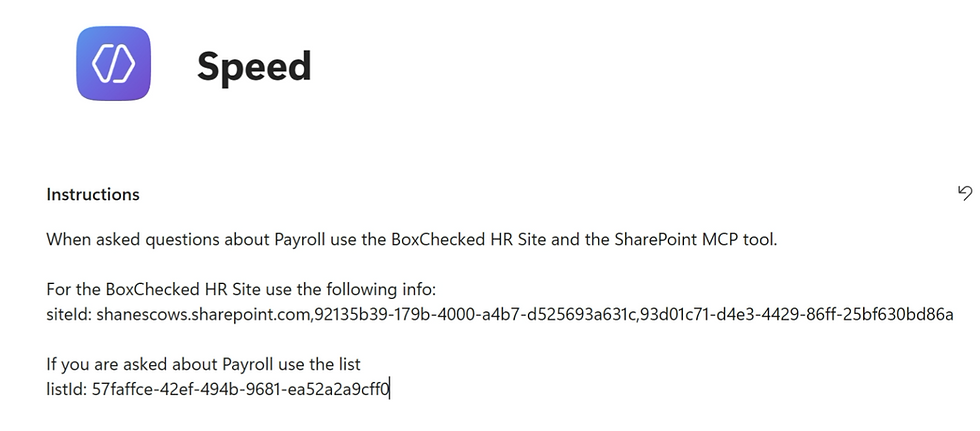
No more guessing! Now when we ask the same question, look at how much cleaner it is.

One call, not three. Saving you time and money while still getting the exact right answer.
Time Is Money, and So Are Tokens
This is not only a speed optimization. It is an economics lesson for agent design.
When an agent performs unnecessary discovery, you potentially pay twice:
Users wait longer for the response.
The agent consumes additional processing and tokens to rediscover information your solution already knows.
That makes stable identifiers valuable configuration. If a SharePoint Site ID, List ID, or internal column name is known and unlikely to change, give it to the agent. Do not turn a constant into a scavenger hunt.
The smartest agent is not the one that performs the most steps. It is the one that performs the fewest steps necessary to produce a trustworthy answer.
Give the Agent Stable Facts, Not Every Possible Answer
There is an important balance here. I am not suggesting that you hard-code every possible path or remove the agent’s ability to reason.
In the test, adding payroll-specific details did not break the broader SharePoint experience.
When I asked about December holidays, the agent still explored the available data, found the holidays list, and returned the answer.
That is exactly what you want. Give the agent shortcuts for the routes you know, while preserving its ability to navigate when the request is new.
Good candidates for stable guidance include:
SharePoint Site or List IDs
Dataverse Environments and Tables
Internal SharePoint column names
Known tool routing for common business questions
Also, while in the video I used the SharePoint MCP this same guidance could be applied to any tool or MCP where it is having to do a lot of discover. Dataverse MCP and SharePoint Get Items are prime examples.
The goal is not to make the agent rigid. The goal is to stop charging it rent for information it already learned.
Filtering the Data Saves Even More Work
The holiday example exposed another efficiency problem. The agent retrieved the entire holidays list, including dates from other months, and then reasoned through all of those rows to answer a question about December.
It worked, but working is not the same as working efficiently. I will skip this part here but if you want to see the filter portion then jump over to the video. https://youtu.be/0FfQoM8iHNA
Do Not Dump Detailed Execution Logic into Global Instructions
There is one architectural warning worth calling out. All of this ID config most likely should NOT be in your instructions, they should be a skill.
Global instructions should contain the things the agent should always know, plus clear routing guidance, like what skill or tool to use when. Detailed execution behavior that only applies to a specific scenario belongs in a skill.
A cleaner pattern looks like this:
Instructions: If the user asks about payroll, use the payroll skill.
Payroll skill: Use the known Site ID, List ID, and any other payroll specific logic to get the answer.
That keeps the base agent focused while still giving each scenario the precision it needs. It also prevents a giant wall of instructions from becoming its own source of confusion and wasted reasoning.
I need to make a video and post about turning complicated instructions into skills, but that is for another day.
A Practical Optimization Checklist
When an agent feels slow or consumes more credits than expected, inspect the activity map and ask these questions:
Is the agent repeatedly searching for the same site or data source?
Is it listing resources just to find an ID that never changes?
Is it retrieving an entire list when a filter could return only the relevant records?
Does it know the internal column names required to create that filter?
Are unused MCP tools enabled and adding noise to the available toolset?
Does scenario-specific execution logic belong in a skill instead of the global instructions?
You do not need to optimize everything on day one. Start with high-volume requests and obvious repeated discovery. Those are the places where a small amount of guidance can create a meaningful cumulative return.
Trust, but Verify
One test run is not a scientific benchmark. Network conditions vary, service response times vary, and in my final one-step test the elapsed time was not automatically lower than every previous run. It was raining, so obviously we can blame the weather. That is how networking works, right?
The important result was the path, not one stopwatch reading. The agent went from three tool calls to two and then to one while producing the same answer. Fewer required operations give you a better foundation for consistent performance and lower consumption, even when individual response times bounce around.
Test each change several times, inspect the activity map, and verify that your shortcut does not prevent the agent from handling related questions. Trust, but verify.
FAQ
Why should I provide a SharePoint Site ID to Copilot Studio?
Providing a known Site ID lets the agent skip the find-site operation. That can reduce tool calls, reasoning, response time, and consumption for repeated requests.
Should I also provide the SharePoint List ID?
Yes, when the agent consistently uses the same list. A known List ID can let it skip enumerating every list on the site and go directly to the target data.
Will hard-coding IDs stop the agent from answering other SharePoint questions?
Not necessarily. In this test, payroll-specific guidance did not prevent the agent from finding and using a separate holidays list. Keep the guidance scoped to the relevant request.
Why provide internal SharePoint column names?
Internal column names help the agent create precise filters without first inspecting list metadata. That can reduce both metadata calls and the amount of list data returned.
Should all of this information go into the agent instructions?
No. Global instructions should hold always-relevant knowledge and routing guidance. Detailed scenario-specific execution logic is better placed in a skill.
Does fewer tool calls always mean a faster response?
Not on every individual run because network and service latency vary. Fewer required steps still remove avoidable work and provide a better path toward faster, more efficient responses at scale.
Key Takeaways
Copilot Studio can discover SharePoint resources, but repeated discovery of stable resources wastes time and tokens.
Providing the known Site ID reduced the demonstrated path from three tool calls to two and cut one observed run from about 15 seconds to about 7 seconds.
Providing both the Site ID and List ID allowed the agent to jump directly to retrieving the list items.
Scenario-specific execution details should move into skills, while global instructions should focus on always-relevant knowledge and routing.
Optimize the agent’s path, then verify the result across multiple runs instead of trusting a single timing measurement.
Build Agents That Value Everyone’s Time
Copilot Studio is good at figuring things out. Let it use that intelligence on the parts of the problem that actually require intelligence.
If you already know the Site ID, give it the Site ID. If you already know the List ID, give it the List ID. If the agent needs a particular internal column name every time it builds a filter, give it that too.
Stop paying the agent to rediscover facts that are never going to change. Your users get a faster experience, and you build a solution that uses its resources more responsibly. Time is money, especially when tokens are involved.
If you want help optimizing your Copilot Studio agents, designing reusable skills, or getting your team comfortable building agents this way, PowerApps911 can help. Whether you need training, mentoring, or someone to build it with you, reach out and let’s build something awesome together.


Comments