
Microsoft Scout Explained: What Microsoft's First Autopilot Agent Is and What It Can Do

Updated: Jun 18
TLDR - Microsoft Scout is the first of Microsoft's new Autopilots: a personal AI agent that runs on your Windows 11 PC, can see local files, browse the web, and write and run code to finish tasks on its own, all inside security boundaries you and your admins control. It runs on GitHub Copilot Business or Enterprise credits rather than your Microsoft 365 Copilot license and getting it running today requires a Frontier organization and an Intune policy.
Microsoft used its Build announcements to introduce something that changes how you think about AI assistants. It is called Microsoft Scout, and it is the first of what Microsoft is calling Autopilots. If you have been using Copilot chat and Cowork and wondering what comes next, this is it: an agent that can run on its own, see your local files, launch a browser, and write and run code to finish a job for you.
This article covers what Scout is, what it can do today, how it gets billed, and the setup you need before you can try it, so you can decide where it fits next to the tools you already use.
Want to see Scout in action? Watch the full walkthrough here: Hands-on with Microsoft Scout.
What is Microsoft Scout?
Microsoft Scout is the first example of Microsoft's new Autopilots. The easiest way to understand it is to line it up against the tools you already know.
Copilot chat is a quick, one-to-one conversation. Ask a question, get an answer, move on.
Cowork takes a recipe or standard operating procedure and runs a task on your behalf. It does the work for you, but on demand. You tell it to go, and it goes.
Autopilots, with Scout being the first, are agents that run and do things for you without you having to sit there and interact. That is the leap.
Scout is built on top of an OpenClaw agent platform, the same kind of technology that had people earlier this year automating everything on their own machines. Some of those experiments went great, and some deleted files or wiped-out accounts because there were no guardrails. What makes Microsoft Scout different is that you get that same autonomy inside the security boundaries provided by Microsoft. You can make sure it is not allowed to delete all your files or touch your bank accounts, and as you will see in the setup section, that security layer is a core part of the product.
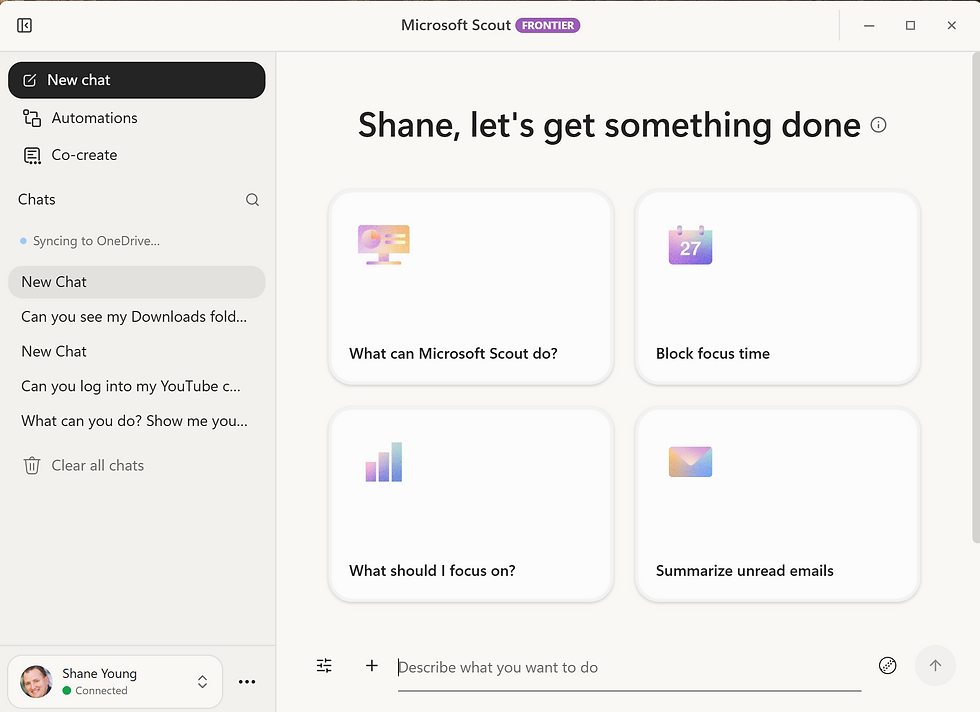
What can Microsoft Scout do?
Scout's real difference is that it reaches beyond the cloud and onto your machine. Copilot and Cowork live in the cloud and will not run code for you or modify anything your desktop. Scout will. Here is what that looks like in practice, with brief examples from a real session.
Read your local files. Scout can look through the folders on your PC. Ask it to see your downloads folder and it will.
Run PowerShell to act on those files. In one example it found leftover installer files, then cleared 31 of them and freed 4.4 GB, after asking permission first. You never have to know what PowerShell is, just another tool Scout uses to accomplish your goals.
Browse the web with a real browser. Scout opens a browser to reach sites and pages, and it will not handle your usernames and passwords, so signed-in sites have limits.
Write and run code to solve a problem. When a browser login blocked it from grabbing a YouTube transcript, Scout installed an open-source tool, wrote and ran Python, and kept trying different approaches until it pulled the transcript and saved it to a working folder. Tenacity!
Save repeatable work as a skill. Once it figures out a task, you can have Scout turn the steps into a reusable skill so next time is faster and uses fewer credits.
Take on a personality. You can choose from a default professional tone, a sarcastic teenager, or an enthusiastic intern, which makes day-to-day use more fun. Now I can have the fun of my mouthy teenagers while at work. 🤣
The key idea across all of this: Scout asks permission before sensitive actions, and you can allow each step just for that session or deny it. You stay in control while it does the work.
These examples are quick to summarize but more fun to watch. If you want to see Scout clean up a drive and write its own Python live, the full walkthrough is here.

How is Scout different from Agent Builder and Copilot Studio?
When you hear the word agent, your mind might jump to Agent Builder or Copilot Studio, but those do a different job. Agent Builder is for chatbot-style agents that chat with a little configuration. Copilot Studio is where you build both conversational and autonomous agents with tools and MCP servers, the kind of enterprise-grade, department-level solution you stand up for a whole team or organization.
Scout is not that. Scout is a personal assistant, an agent running just to do things for you. In the broader agent progression, it lands in the no-code bucket alongside Copilot for SharePoint, Agent Builder, and Cowork, even though it can run its own code under the hood. Above that sit Copilot Studio and Agent Flows for enterprise solutions, and above those is full code. Scout is interesting precisely because it lives in the no-code world while still being able to run code, which the other no-code options cannot do.

Chat vs Cowork vs Scout: what's the difference?
If you already use Copilot Cowork, Scout can feel familiar at first. The easiest way to understand where it fits is to line it up against the two tools you already know. The real difference is not what each one knows, it is how much it does on its own.

Copilot Chat is reactive. It is a quick, one-to-one conversation. You ask a question, you get an answer, and you move on. Nothing happens until you type again.
Cowork works on demand. You hand it a recipe or standard operating procedure and it runs the whole task on your behalf. You say go, it goes, and then it stops.
Scout is autonomous. It is a personal agent that runs and does things for you without you sitting there to drive it. Through automations and heartbeats, it can work in the background on a schedule or a trigger, and unlike Chat and Cowork it can reach your local files, launch a browser, and write and run code, all inside guardrails you control.
Think of it as an autonomy ladder. Chat answers, Cowork delivers a task, and Scout runs on its own. That last step, an agent that keeps working while you do something else, is what makes Scout a real shift rather than just another chat window.
What are automations and heartbeats?
Scout can work in the background two ways, and they are easy to mix up.
Automations feel like a Power Automate flow. You tell Scout to run a prompt on a schedule or when a condition is met, such as every hour, once a week, or when a certain file changes. For example: every day at 4:00, check for new videos and generate the summary content that goes with them. You can then run multiple steps.
Heartbeats run a prompt on a recurring pulse, such as every 30 minutes, every two hours, during work hours, or always. A common example is triaging your inbox each hour to flag urgent messages from your boss. Running just the same prompt each time.
Both can run quietly while you do other things, which is the whole point of an agent. Just be deliberate about frequency. You are paying for usage, so a heartbeat every 15 minutes around the clock burns credits fast. When you set up an automation, also review its permissions and only grant what it needs. If an automation never needs the file system or the ability to run code, do not give it those rights.
What tools, skills, and MCP servers can Scout use?
Scout ships with built-in skills for Word, PowerPoint, Excel, Loop, and building websites and HTML. You can add your own skills too, since a skill is just a pre-packaged recipe written in markdown. You can even ask Scout to write a skill for you so you do not have to spell out every step again.
You can also connect MCP servers, which is how you expand what Scout can reach. One of the things that boxes in Cowork and Copilot is that they are sealed off. With MCP servers you can give Scout access to other tools and data, for example a Dataverse MCP to pull in Dataverse and Dynamics data, or Power Apps MCPs. If you do not know what MCP servers are yet, that is fine. You will get there.
Which model and settings should you use?
Scout lets you pick the model behind each chat, and the choice affects both quality and cost. The default when you first turn it on can be one of the most expensive options, so match the model to the job. Deep, hard thinking may justify a premium model, while cleaning up a hard drive runs fine on a cheaper, lighter one. You can set a default model in settings so it is always your preferred choice.
A few other settings matter. Memory lets Scout learn about you over time. Your default working location is where Scout has the most permissions, and asking it to work outside that location triggers more permission prompts, so set it to the workspace you actually want. Finally, Scout has a prevent sleep setting that needs to be on, because automations and heartbeats only fire while Scout is running.
How is Microsoft Scout billed?
This is important and easy to miss. When you install Scout you connect it to your GitHub Copilot, and it uses your GitHub Copilot credits to do its job. Scout is not included in your Microsoft 365 Copilot licensing. As of today you need a Microsoft 365 account plus a GitHub Copilot Business or Enterprise account with credits available. The more Scout does, the more credits it uses, so cost scales directly with usage. This is all frontier and new, so Microsoft may change how it works, but that is the model right now.
What do you need to set up Microsoft Scout?
Installing Scout itself is next, next, finish. The challenge is everything that has to be in place first, and this is the part that keeps most people from trying it today.
On the user side you need Windows 11, a Microsoft 365 account, permission to install the app, and a GitHub Copilot Business or Enterprise license, since that license is where the consumption comes from.
The admin side is where the work piles up. Your organization must be a Frontier organization. Then an admin configures a Microsoft Scout Intune policy on the target devices, which means setting up Intune, creating a policy, adding the user, and getting the PC to accept it. After that you complete a Microsoft form acknowledging that Scout can process data outside the Microsoft safety bubble, because if GitHub Copilot is configured to use external models, Scout will use them too. None of this is trivial, so if you want to try Scout, engage your IT team early.
If you have any questions or need assistance with Microsoft Scout, just click the button below and let us know how we can assist.
Frequently Asked Questions
What is Microsoft Scout?
Microsoft Scout is the first of Microsoft's Autopilots, a personal AI agent that runs on your Windows 11 PC and can complete tasks on its own. Unlike Copilot chat, which is quick question and answer, and Cowork, which runs recipes on demand, Scout is built to run in the background and act for you within security boundaries you and your admins control.
How much does Microsoft Scout cost?
Scout runs on your GitHub Copilot Business or Enterprise credits, not your Microsoft 365 Copilot license. There is no flat cost. The more Scout runs, the more credits it consumes, so cost scales with how much you use it.
What do you need to run Microsoft Scout?
You need Windows 11, a Microsoft 365 account, permission to install the app, and a GitHub Copilot Business or Enterprise license. Your organization must be a Frontier organization, and an admin must configure a Microsoft Scout Intune policy and a data acknowledgment before it will run.
Is Microsoft Scout safe to use?
Scout asks permission before sensitive actions, and you can allow or deny each one. Admins set boundaries through Intune, and you can restrict what automations are allowed to do, such as blocking file system or code access, so it only ever has the permissions it needs.
What is the difference between automations and heartbeats?
Automations run a prompt on a schedule or when a condition like a file change is met. Heartbeats run a prompt on a recurring pulse, such as every 30 minutes or during work hours. Both consume credits, so set them on a cadence that matches what you need and can afford.
Key Takeaways
Microsoft Scout is the first of Microsoft's Autopilots, a personal agent that runs tasks on its own rather than only on demand.
Scout can read local files, run PowerShell, browse the web, and write and run code, which Copilot chat and Cowork cannot do.
Every sensitive action requires your permission, and admins set the security boundaries through an Intune policy.
Scout runs on GitHub Copilot Business or Enterprise credits, not Microsoft 365 Copilot licensing, so usage has a direct cost.
Automations run on schedules or triggers, while heartbeats run a prompt on a recurring pulse, and both consume credits.
You can extend Scout with built-in skills, your own skills, and MCP servers such as Dataverse or Power Apps.
Setup today requires Windows 11, Microsoft 365, a Frontier organization, and an Intune policy, so involve IT early.
Let's Build Something Awesome Together
If you want help getting Scout set up, or you are trying to keep up with all this AI and make your business more productive, the team at PowerApps911 can help. We offer consulting and training, including our Microsoft Power Platform and AI University. Reach out by clicking the Contact Us button and let us know how we can help.


Comments