
Mastering Power FX for Better Apps


Power FX: Built for Makers
Power FX is the engine behind how your apps and automations behave. If you’ve ever written a formula in Excel, you’re already halfway there. Microsoft designed Power FX to feel familiar and intuitive, so your spreadsheet skills translate directly into building smarter, faster solutions.
Pro Tip: Microsoft’s Power FX Reference is a must-have bookmark. It’s searchable, well-structured, and kept up to date with every new function.
Read the Helper Text (Yes, Really)
That little pop-up box when you write a formula? It’s called helper text, and it’s more powerful than most people realize. It walks you through what’s required, what’s optional, and where you are in the formula, step by step. That blue highlight? It’s your guide that tells you where you currently are!
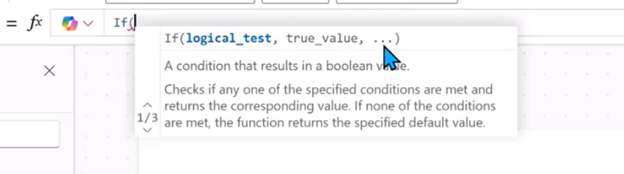
For example, typing "If( " will show you exactly what content this formula requires: the logical test and the true result. Optional parts are hidden behind ellipses (…); just type a comma or semicolon to move forward.
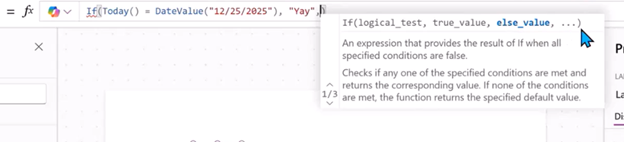
Once you know how to read it, writing complex formulas becomes much less frustrating and a lot more efficient.
Don’t Ignore the “Error” Functions
Power FX includes built-in ways to catch and handle errors gracefully, a must for building apps your users can trust.
Use IsError() or IfError() to catch issues without showing red error messages.
Example: IfError(1/0, "Oops, something went wrong")
This keeps your app running smoothly and gives users clear, helpful feedback when something doesn't go as expected.
Use Variables, But Use Them Intentionally
It’s tempting to Set() everything, but too many global variables can turn into a debugging nightmare. Use them where they make sense. Then consider alternatives like passing values directly or using ClearCollect() to store and reuse data. Local variables (UpdateContext()) are great for managing screen-specific state without cluttering your app.
Shane dives deeper into this in his 201 training, especially how to avoid "variable soup."
Key Takeaway
Power FX is designed to be approachable, but mastering its features, like helper text, error handling, and smart variable use, can dramatically improve the reliability and maintainability of your apps. Build with intention, and you’ll build apps your users love.
If you're looking for some quick help with Power FX or maybe something else you are working on, we are just a click away. Reach out, and let us know how we can help!



Comments